Go Home, Windows EXE, You're Drunk
published on Jan 15 2026
Because Windows 11 is Bad, I've been playing with Wine lately. Mostly trying out various windows-exclusive softwares that I really like, in order to see how they would work on Linux. But also, doing some surface level exploration of how Wine works. It led me to the following fun experiment that I want to share...
Syscalls and Wine
Let's talk about syscalls. You probably know what they are. If you don't, you should read the relevant section of the assembly tutorial on this blog! But, in short, syscalls are services that the operating system can perform for the applications. Things like opening/reading/writing files, allocating memory, etc. are all done via syscalls at the end of the day.
In the post linked above, I had explained that there is an important difference between how applications use the `syscall` instruction on Windows vs. Linux: on Linux, application code is expected to use the syscall instruction directly, whereas on Windows, applications are not expected to use syscall directly. They're supposed to call WinAPI functions, which handle direct communication with the OS kernel behind the scenes.
This last bit is crucial for Wine. Roughly speaking, Wine "just" has to load the windows portable executable file, make everything in the process address space look like Windows and provide its own set of "system libraries" containing the implementations of the WinAPI functions (all of this is already _a lot_ easier said than done, and i'm still skipping a lot of detail).
The code of the Windows program executing under Wine runs like that of any other normal process - there's no "virtualization" of any kind, nothing's really "emulated" other than the set of functionality provided by WinAPI. From the Linux kernel point of view, that Windows program is just another process.
Unfortunately, not every Windows program follows the rules. You see, Windows syscall conventions are not exactly secret. Microsoft just makes no guarantees about those conventions remaining stable (since you're not supposed to rely on them!), though in practice a lot of them are stable. Because of that, some programs will just use syscall directly - usually for performance reasons.
Such programs are a huge problem for Wine. If you execute the syscall instruction under Linux while using the Windows conventions, nothing good will happen - most likely the process will just crash. There are potential ways to get around this problem but none of them are easy - as far as I'm aware there is no 100% working solution at the time of this writing.
The Unholy Wine-Drunk Chimera
A nagging thought wormed its way into my head: yeah, making direct Windows syscalls under Wine will fail. But what about making direct syscalls using Linux conventions? That should work, right? Linux syscalls from a Windows program? I really see no reason why it would fail.
It's a stupid stupid idea. Literally nobody needs or wants this. There's zero practical utility because no program written to be executed on Windows contains raw Linux syscalls. But I just had to see if it was possible. So, I broke out my trusty friend Flat Assembler:
format PE64 NX GUI

entry start

section '.text' code readable executable
  start:
    ; Win64 calling convention appeasement - align stack.
    sub	rsp,8*5

    ; Call the MessageBox WinAPI function to show we're really running under
    ; Wine.
    xor r9, r9
  	lea	r8,[msg_win]
	  lea	rdx,[msg_win]
  	xor	rcx,rcx
  	call	[MessageBoxA]

    ; Execute a Linux syscall
    mov rax, 1 ; Syscall no 1 - "write to file"
    mov rdi, 1 ; File handle for stdout
    mov rsi, msg_lnx ; byte buffer to write to the file
    mov rdx, [msg_lnx_len] ; buffer length
    syscall

    ; Exit cleanly.
    xor rax,rax
    call [ExitProcess]

; Import table stuff (not interesting, included for posterity).
section '.idata' import data readable writeable

  dd 0,0,0,RVA kernel_name,RVA kernel_table
  dd 0,0,0,RVA user_name,RVA user_table
  dd 0,0,0,0,0

  kernel_table:
    ExitProcess dq RVA _ExitProcess
    dq 0
  user_table:
    MessageBoxA dq RVA _MessageBoxA
    dq 0

  kernel_name db 'KERNEL32.DLL',0
  user_name db 'USER32.DLL',0

  _ExitProcess dw 0
    db 'ExitProcess',0
  _MessageBoxA dw 0
    db 'MessageBoxA',0
And wouldn't you know it? It totally worked!
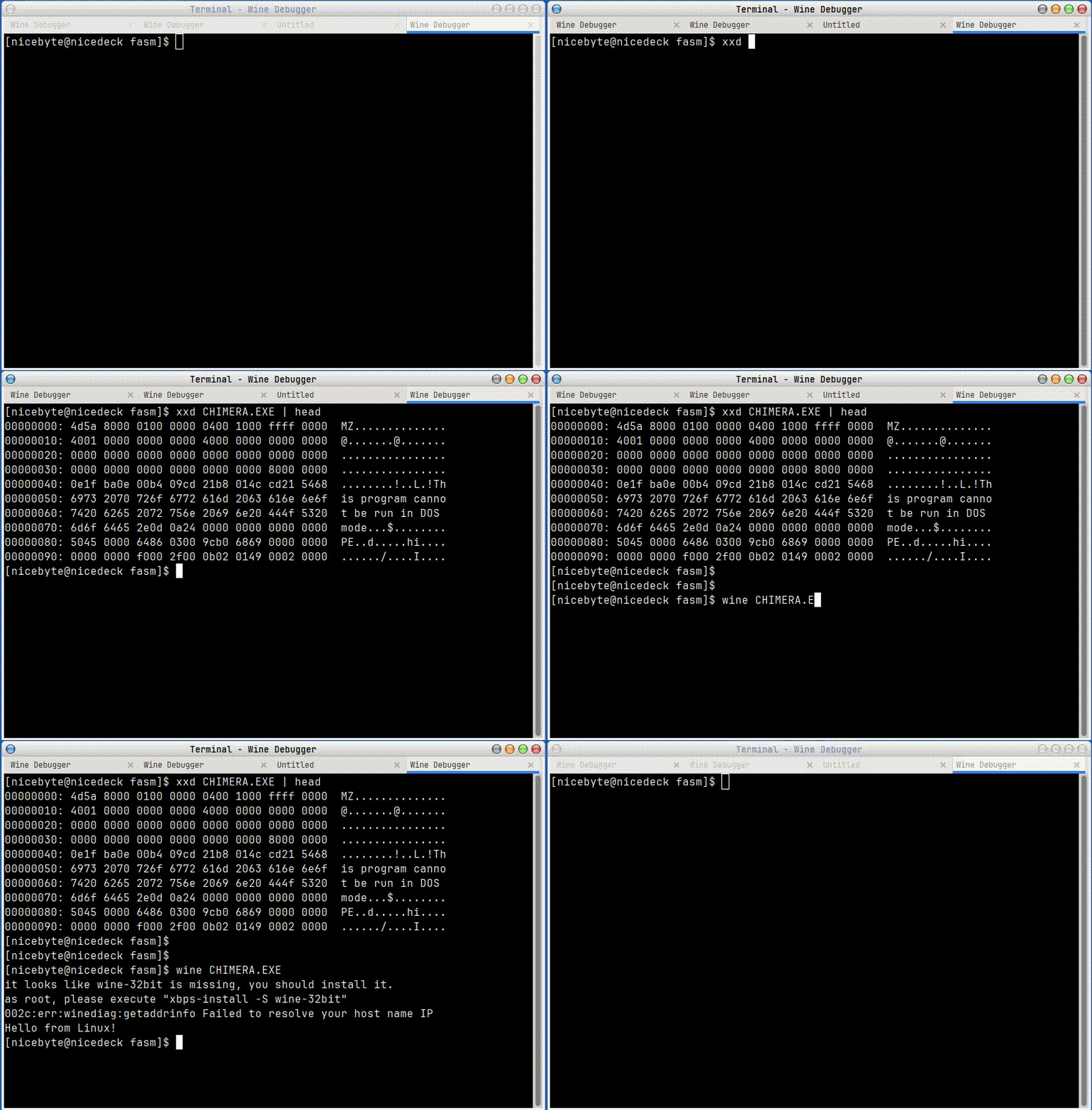
For fun, I also tried using fork and execve to launch a linux program. Launching the new program works, though it seems to crash the original process:
format PE64 NX GUI

entry start

section '.data' readable writeable
  msg_win db "Hello from Windows!",0
  binary_path db "/usr/bin/mousepad",0
  envvar0 db "DISPLAY=:1.0",0
  envvar1 db "XAUTHORITY=/home/nicebyte/.Xauthority",0
  envvars dq envvar0, envvar1, 0
  argv    dq binary_path, 0

section '.text' code readable executable
  start:
    ; Win64 calling convention appeasement - align stack.
    sub	rsp,8*5

    ; Call the MessageBox WinAPI function
    xor r9, r9
  	lea	r8,[msg_win]
	  lea	rdx,[msg_win]
  	xor	rcx,rcx
  	call	[MessageBoxA]

    ; Linux syscalls
    mov rax, 0x39; fork
    syscall

    cmp rax, 0
    jnz exit

    mov rax, 0x3b ; execve
    mov rdi, binary_path ; ELF executable file name
    mov rsi, argv
    mov rdx, envvars; environment vars
    syscall

    exit: ret

; ..import table stuff skipped...
So yeah, you can make linux syscalls from windows programs, as long as they're running under Wine. Totally useless, but the fact that such a frankenstein monster of a program could exist is funny to me.
Like this post? Follow me on bluesky for more!